# Quick start (/docs/getting-started/quickstart)
This is the simplest useful thing you can do: expose one agent over A2A and talk to it.
 ## 1. Install and sign in [#1-install-and-sign-in]
You need Node 20+ and a GitHub account with Copilot access.
```bash
npm install -g a2a-copilot
gh auth login # or: export GITHUB_TOKEN=...
```
## 2. Write a config file [#2-write-a-config-file]
Save this as `config.json`:
```json title="config.json"
{
"agentCard": {
"name": "Copilot Agent",
"description": "GitHub Copilot as an A2A agent",
"version": "1.0.0",
"protocolVersion": "0.3.0",
"streaming": true,
"defaultInputModes": ["text"],
"defaultOutputModes": ["text"],
"skills": [
{ "id": "assistant", "name": "Coding Assistant", "description": "Answer coding questions", "tags": ["code"] }
]
},
"server": { "port": 3000, "hostname": "127.0.0.1" },
"copilot": {
"model": "auto",
"systemPrompt": "You are a concise coding assistant.",
"systemPromptMode": "replace"
}
}
```
`"model": "auto"` lets Copilot choose a model your plan can use. If you pin a model and see `Model "..." is not available`, that model is not enabled for your account.
## 3. Start the server [#3-start-the-server]
```bash
a2a-copilot --config ./config.json
```
The server binds to `127.0.0.1`, so only your machine can reach it.
## 4. Discover the agent [#4-discover-the-agent]
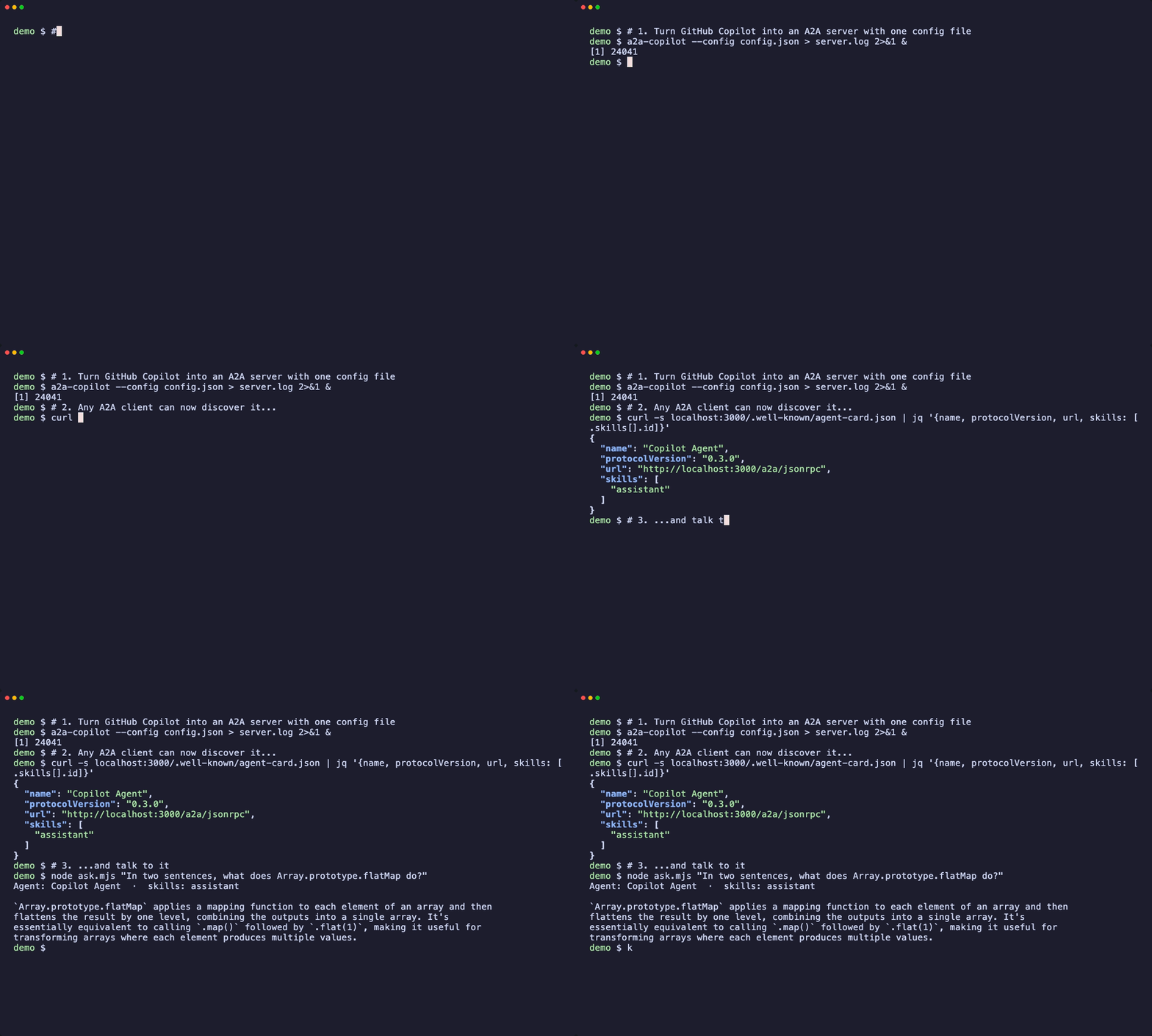
Every A2A agent publishes an agent card. Any client starts here:
```bash
curl -s localhost:3000/.well-known/agent-card.json | jq '{name, protocolVersion, url, skills: [.skills[].id]}'
```
## 5. Talk to it [#5-talk-to-it]
```bash
curl -s -X POST localhost:3000/a2a/jsonrpc -H 'content-type: application/json' -d '{
"jsonrpc": "2.0", "id": "1", "method": "message/send",
"params": {
"message": { "kind": "message", "messageId": "m1", "role": "user",
"parts": [{ "kind": "text", "text": "What does Array.prototype.flatMap do?" }] },
"configuration": { "blocking": true }
}
}'
```
`"blocking": true` makes the call return when the task completes. The answer is in the task's `artifacts`. The repository also ships a tiny dependency-free client, [`ask.mjs`](https://github.com/shashikanth-gs/a2a-wrapper/tree/main/examples/copilot-quickstart), that does exactly this.
Because this is standard A2A, the same server works with the official A2A SDKs, inspectors and other orchestrators.
## Other backends [#other-backends]
Claude, Codex, OpenCode and Antigravity work the same way. Only the package name and the backend block in the config change. See [choosing a wrapper](/docs/guides/choosing-a-wrapper).
## Next [#next]
Combine several agents: one implements, another tests.
Before you expose an agent beyond localhost.
## 1. Install and sign in [#1-install-and-sign-in]
You need Node 20+ and a GitHub account with Copilot access.
```bash
npm install -g a2a-copilot
gh auth login # or: export GITHUB_TOKEN=...
```
## 2. Write a config file [#2-write-a-config-file]
Save this as `config.json`:
```json title="config.json"
{
"agentCard": {
"name": "Copilot Agent",
"description": "GitHub Copilot as an A2A agent",
"version": "1.0.0",
"protocolVersion": "0.3.0",
"streaming": true,
"defaultInputModes": ["text"],
"defaultOutputModes": ["text"],
"skills": [
{ "id": "assistant", "name": "Coding Assistant", "description": "Answer coding questions", "tags": ["code"] }
]
},
"server": { "port": 3000, "hostname": "127.0.0.1" },
"copilot": {
"model": "auto",
"systemPrompt": "You are a concise coding assistant.",
"systemPromptMode": "replace"
}
}
```
`"model": "auto"` lets Copilot choose a model your plan can use. If you pin a model and see `Model "..." is not available`, that model is not enabled for your account.
## 3. Start the server [#3-start-the-server]
```bash
a2a-copilot --config ./config.json
```
The server binds to `127.0.0.1`, so only your machine can reach it.
## 4. Discover the agent [#4-discover-the-agent]
Every A2A agent publishes an agent card. Any client starts here:
```bash
curl -s localhost:3000/.well-known/agent-card.json | jq '{name, protocolVersion, url, skills: [.skills[].id]}'
```
## 5. Talk to it [#5-talk-to-it]
```bash
curl -s -X POST localhost:3000/a2a/jsonrpc -H 'content-type: application/json' -d '{
"jsonrpc": "2.0", "id": "1", "method": "message/send",
"params": {
"message": { "kind": "message", "messageId": "m1", "role": "user",
"parts": [{ "kind": "text", "text": "What does Array.prototype.flatMap do?" }] },
"configuration": { "blocking": true }
}
}'
```
`"blocking": true` makes the call return when the task completes. The answer is in the task's `artifacts`. The repository also ships a tiny dependency-free client, [`ask.mjs`](https://github.com/shashikanth-gs/a2a-wrapper/tree/main/examples/copilot-quickstart), that does exactly this.
Because this is standard A2A, the same server works with the official A2A SDKs, inspectors and other orchestrators.
## Other backends [#other-backends]
Claude, Codex, OpenCode and Antigravity work the same way. Only the package name and the backend block in the config change. See [choosing a wrapper](/docs/guides/choosing-a-wrapper).
## Next [#next]
Combine several agents: one implements, another tests.
Before you expose an agent beyond localhost.